Mutant Rabble!

I thought I was being super creative by converting Vampire Count crypt ghouls into a mutant Penal Legion, but it turns out some guys have already done this (very nicely too) so I can't claim credit for the idea. I expanded my idea from the Plague Bearers conversion who are also based on Vampire Count models. Unlike the Zombies these models are hunched over in wicked fashion and look like they are insane. They remind me a lot of the zombies from I am Legend. I might have to make an Inquisitor to look like Will Smith


Converting these were a whole lotta fun! It was a trial of "How much crap can I drill and glue into these poor bastards" and the answer is: a lot! Guitar wire cabling, small screws along their spines, and knife blades protruding from unclosing wounds are just a few of the things they have to endure. That's one hell of a fraternity pledge.

These mutants were guardsmen who were captured and unwillingly turned to Chaos. The Dark gods cackle at the ironic fate of their new subjects. Their captors and now masters rule them with contempt as they are considered the lowest rung in dark ranks, twisted fiends being little more than a slave and often times the recipient of the cruelest treatment.

To cover the load-out options, I equipped them with a lasgun and close combat weapons. This way they can count as Penal Legion or Guardsmen which will hopefully keep the beardy mouth-breathers at bay.


On a completely different tangent I re-watched the Southpark ep. featuring Al Gore vs. Man-Bear-Pig and it still makes me LMAO. I'm SUPER CERIAL! I honestly can't believe those guy got away with all the crazy shit they've said over the years. I love it. In closing I'd just like to say....

Low Standards!

Hey everybody!

I apologize for the long over-due post. My stupid pc decided to retire early which made blogging difficult. Most of my photos are still stuck on my hard drive so for the time being I'm posting what was still on my camera. Hey, it's a start right?


Speaking of starts (terrible segway I know) this was an old fantasy model I picked up a while ago from my FLGS. I thought the pose would make for a good standard bearer. Still debating on leaving the chain-mail loin cloth as-is or greenstuff in the lower half of a jacket. I fear that doing the latter may make him look pantless like one of the chipmunks. Then again he is Chaos so anything goes, right?

EDIT: Oh yeah I'd like to apologize for the cat hair in the first pick. My kitty is a master at projecting hair onto things.


More updates to follow  :)


Chaos Sentinel Update

Here's a few updated pics of the Chaos Sentinel. The spikes from the base were transplanted to the Sentinel since having the same material in two different places might look confusing. The base will have a toxic wastelands theme, littered with rubble and sealed in a coat of resin. The idea is to make it look like the Sentinels are treading and dredging through rough terrain to flank their enemies.

 Small gauge wire was added around the spikes and corpse.

 
The next step is to define the spikes some more (so they don't look so much like sprue chunks) and maybe some more brackets on the wire for added detail, but for the most part the chassis is complete. I don't want to bog it down with too much chaos-y stuff (I'm resisting the urge at least).


Time to break out the dremel and make this guy look a little meaner!


Thanks for reading :)


Modding a ML

After recently purchasing a Valkyrie, the seller threw in an unassembled Sentinel free of charge. Score! Both models came new-on-sprue, with instructions, at less than helf retail price. If I wasn't a terrible dancer I would dance right now. Ahem, it was very cool of him to do that.


For starters the  armaments needed a little beefing up. I had the idea of running cables through the eye sockets of the skull emblem.

 A couple of guitar strings will do the trick

The normal mounting position is the hole below the cockpit, but I really wanted to try something different. I thought it would look cool with the weapon following the pilot's  line of sight.

 Pin in place and ready to glue. I also cut and refit the feet around the terrain chunks.

I was slightly concerned with the tension the strings/cables added on the weapon, but it held firm and adds a nice touch of detail.

To keep the cables tight a staple was added on the Missile Launcher. It was slightly tricky to keep in place, but that's probably because it was a last second addition.

A few more details were added like spikes and an impaled torso. I opted for the open canopy so the pilot would be more visible. The spikes are from old sprues I had lying around.

I'm satisfied with the results so far. All that's missing are more chaos-y bits (you can never have enough spikes). I haven't decided if (or how) claws will be added to the feet. They look cool on the drawing board, but I don't want the model looking too eclectic with pieces just strewn about.


More pics will be up later this week. Cya then!


Inspiring IG Blogs

Today I thought I'd post a link to a lot of great inspiring Blogs. The theme is Imperial Guard armies. There are a lot of Blogs out there, but these are just a few I've had the pleasure of finding (insert Zelda secret sound here).

Ever have the urge to make an Epic Armageddon Army? Go to Onyx's Hobby Blog where he has some AWE inspiring armies for you to look at. There's a whole lot of armies to drool over!


We can't forget the Traitor Guardsmen now can we? Chaosgerbil's blog is packed full of battle reports and insight into the mind of chaos. This is a great example of what my army aspires to be. I may have to try this out as well: Codex_Lost_and_The_Damned_ChaosGerbil_v5

Praetorian 77th
I clicked this link almost on accident while browsing the Dakka Dakka forums. To my surprise I found a great Blog devoted to the Praetorian 77th regiment. It's more than just Imperial eye-candy; there's also a lot of unique design work like the Rough Rider's conversion (which is the closest I've seen to what I have planned).

Col.Gravis' Praetorian Imperial Guard
Another fantastic Blog devoted to the Praetorians. You can find just about anything you want to know about the Praetorians here. My personal favorite is Malcador Defender "Dauntless", but I'm a sucker for Super Heavies (Aren't we all?)

These are but a few of the many great blogs out there. Of course there are so many to mention, but I'm tired of typing and really want to paint now. Please follow them if you haven't already!


Have a cool site to add? I'd love to hear about it


Attack of the RED HATs!

More pics of the Renegade IG army. This time it's of the first batch of troops to test the paint scheme.

The bodies are from a set of troopers I got a few years back. One model was chopped up to later be used as an objective marker. That project, however, was put on hold since it didn't work the way I hoped. The other four troopers I used for testing paint schemes.

Now that the Renegade project is going, nearly anything that isn't nailed down is going into this project lol. My primary goal is to build the army as creatively and inexpensive as possible. Troops, like the ones above, are fairly easy to come by. A lot of times people will disregard a model because it has a really rough looking paintjob or some wear-n-tea. Armor, like a Basilisk or Valkyrie, can be quite expensive especially when armies require lots of them.

Fortunately there's eBay and I've had some luck finding good deals. I managed to grab a few Leman Russ tanks, a Valkyrie, and a Baneblade all at good prices. With any luck I'll be able to fill in some more gaps in the list without paying too much  :)

Traitor IG

Work continues on the Renegade IG army.

I was a bit reserved on creating this army, mostly due to the fact that GW keeps raising prices so often. Thanks to eBay, however, and some *cough* bartering with my FLGS, I was able to obtain a few good deals and get the army started.


The model is from the Colonel Schaeffer's Last Chancers set (the Hero). He is a cool model, but needed some modifications to make him a bit more ...chaos-y. Both arms were removed and replaced with a power fist and a CSM plasma gun. I don't know why I added the plasma gun. It was the only gun that looked cool so I'm going to make it work. The head was also upgraded to a cool gas mask with officer's hat (I can't remember where it's from though). Plasticard was used to make the claws, though I don't see them lasting very long without a lot of modification.

I have a lot more plastic and pewter staring back at me demanding more attention. Who am I to deny the Chaos Gods?  :P

More pics to come including the Penal Legion Mutants. Cya then!

Matt drops the Hammer

This is a well made argument video by Matt from Miniwargaming.com. It's directed toward GW on how they treat their local retailers. Check it out.


Too many mouths to feed!

Ah yes, who doesn't love Flamers of Tzeentch? Probably your opponent, lol.

For the points they can be quite devastating. They glance and wound on a 4+ (which really hurts MEQ armies). Thanks to the Deep Strike rule you can drop them in for a suicidal strike, or if you prefer hide them somewhere safe and rely on their jump ability and 4+ invulnerable save. They give the Daemons a much needed anti-tank punch.

You might ask "How many should I run, though?" The answer is simple; groups of three are very effective. The reason is flamers can't get any more than three templates off (Breathe of Chaos) on their first round of shooting. I suppose you could run more units, with one having Bolt of Tzeentch (30 points Range 24" Str 8 Ap1), though for the point cost I don't think it's worth it.

When Deep Striking you place the first unit (assuming they didn't mishap) then the second and third starting in a circle in the next row. That means the unit's bases are all touching one another. Adding a fourth model doesn't allow you to fire one of the templates without wounding your own units, which makes them less useful as a suicide unit. Granted, you can always run up to twelve, but if you want that many you may as well run a few squads of three instead. You'll get better results having more squads if you plan to drop them in as suicide units.


I got a good deal recently on a three pack of Flamers. It'll be nice to have the extra models (as I don't trust the pewter to stay together).


A couple coats of Flat White and they're ready for base coating. after a little touch up (I like to add a few watered down skull white layers to help reinforce the base coat) I'll start by adding a few coats of blue ink.

Once the wash dries I paint the flame areas with Iyanden Darksun base coat. It works great if you want to start a solid coat for yellow areas or in this case painting a flame. My only complaint about GW base paints is that they are pretty thick, so much so it's almost like painting with glue lol. I heard this is because they have such a high pigment (oink, jk). Still, a little water is all you need to keep it nice and smooth.

NEW! Blood Crushers

After a recent trip to my local FLGS I picked up the new Blood Crushers box. They allow you to trade in good condition books for store credit. Luckily for me I had a few nice books laying around collecting dust, lol.

The new Blood Crushers are fantastic. Not only are they all plastic (woot!) but there are also some extra bits to customize them how you like. Very niiice!

Aside from being plastic, the models fit together very nicely. My biggest complaint for the old models was that the riders kept falling off. The new models, however, fit together in multiple places. This really helps keep them together. Also, plastic fuses together with super glue so you don't have to worry about them falling apart with normal wear and tear.

In the box you have the option of five different Blood Letter (rider) and Juggernaught (mount) heads. They also supply you with five round bases and square ones too.

The riders also have the option of wielding the standard Hellblade or a variety of other weapons. I decided on equipping them with the Icon of Chaos, The Herald's war gear, and a standard Hellblade.

I didn't use the Instrument of Chaos since I never play it. This upgrade allows you to win assaults resulting in a draw. In my experience with these guys they either win or lose in assault by no small margin making the instrument not worth the points.


The above pic you can see it overhanging the base quite a bit. It may hinder base to base contact somewhat, but hey it looks cool :P


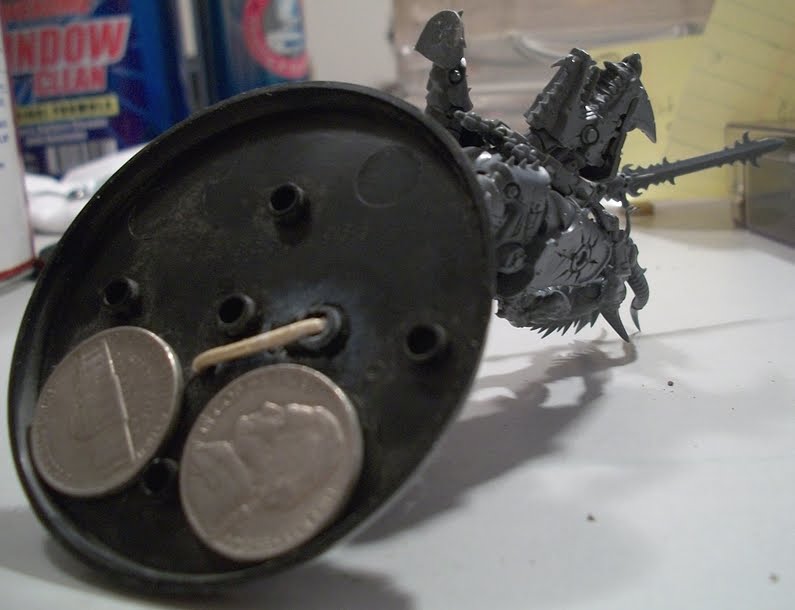
This model needed a little pinning to keep it in place. After drilling the pilot holes I took a small piece of bronze rod and formed a "u" joint. A few nickels were then added to for counter balance.


Now I'm off to base them. More pics coming soon :)


Creed and Kell: Painting the Standard

I inherited another commision, this time it's Creed and Kell for my friend's Cadian Imperial Guard. I've never painted a standard before so I was looking forward to the challenge.

Paints used -
Red areas: Mechrite Red.
Skin: Elf Flesh
Armor: Catachan Green
Cloth: Kommando Khaki
Boots: Codex Grey
Scrolls and Seals: Bleached Bone
Rope, belt, and gold area base: Scorched Brown
Metallic areas: Boltgun metal and Shining Gold


I started out with a white base coat. From here I painted what I was familiar with first, which was Kell's armor and effects.

You might notice the red area on the flag is a little lighter. I wanted to test how well it would coat and was pleased with the results. Mechrite red is a great foundation paint as long as it's thinned out a little bit (otherwise it's like painting with glue lol).


Slowly I worked in the chaos black to the banner. I took my time around the areas I wanted to remain white (like the aquilla).


Once the black was finished a little touch up was needed. I switched to a detail brush and carefully worked the edges. It helps to water the paints a little and keep the brush clean.


Filling in the other areas such as the sword hilt and wiring. Yellow was added to the search light and rope. The Standard lettering was based in mechrite red.


After a little more detail work the base is finished and ready for a wash.

Something I learned a while ago is to base any gold areas first with a brown base color. Gold is the only color that requires this in order to get a better effect.

Lava Board VI: Finished! (again)

I lied before when I said it was finished. By finished I meant that I was done painting it for a while and needed a break.

One thing I noticed later on, and compared to other examples, was the lack of contrast in the lava to the surface. It sort of looked like a river of burning cheese, lol. A river of molten cheese sounds cool, but I'll have to try that later.

After going over the lava again with a heavy dry brushing of orange, I added in a little red to the mix and gradually worked up to solid red. It definitely brought a nice contrast to the board.

.

Once that dried a mix of 6:1 red/medium gray was dry brushed over the surface again. This was followed up with a little pure black over the tips of the lava. I planned on skipping black this time, but I think it adds to the texture.

What lava board would be complete without some chaos-worshiper's ruins? For fun I took some extra foam and melted a few "faces" in it with the hot glue gun.


Lava Board V: Finished!

The Lava board is finished and ready for gaming! It took a few hours a day over the course of three weeks. Most of the time spent was gathering materials and changing the layout (I accidentally glued the wrong pieces down lmao). If I were to make this again, with what I've learned, it would probably take only a week with a majority of the time waiting for the caulking to cure.


This is the first bit of dry brushing. I used a bottle of gray rather than mixing black and white. I find it easier since you have the same exact color every time. I used a 3" brush over the surface areas and a 1 1/2" brush on the edges and lava channel.


A lot more dry brushing. After going over the surface and edges a few more times I added a little off white (bleached bone) to the mix and started dry brushing around the lava area. When the paint was nearly dried up I pressed firmly along the edges to exaggerate the shape of the cuts.


The board from a different angle. Here you can see the edging a little better. Notice the glow on the bridges? The terrain pieces were scrap from the lava areas. I'm planning to make more dynamic pieces later. Somebody asked about the wood bridge; it's actually for something else but it will do for now until I make a more appropriate one lol.


There you have it. A cheap and easy to make lava gaming board. Again I'd like to thank the original author for the inspiration. Had it not been for his great post I probably would have made a very basic board. I'm glad I took the time to make this and I can't wait to play test it!

A few things I'd like to add to his idea
  • The foam doesn't like to bond to adhesives. Be sure to prime it before bonding it.
  • Once the board is finished use a clear coat to seal it. This will help prevent wear-and-tear.
  • Blending the colors will add to the detail.
  • When painting try to paint like objects at the same time. I made the mistake of skipping a section and it was difficult to match it later.
  • Each 2x4 section used about 1 canister of adhesive and acrylic caulking for the lava. I recommend having 1 of each per section you make.
  • The biggest cost was the latex paint; it cost $22 at Home Depot. If you can get it cheaper this will cut your cost.
  • Subscribe to my blog! :P

From here I'm going to start building the area terrain and some taller sections. For the middle area I'm thinking of a making a floating Tzeentch fortress :)


If you decide to make your own I hope you found this tutorial helpful. :)


Lava Board IV: The Lava

Now comes the fun part: Painting the lava! I did mine a little differently than the tutorial. The big difference is I didn't use red (since I ran out and was too lazy to go buy some). I used more orange and a little brown (8:1 orange and gray) which turned out pretty nice.

It's up to you want to paint the lava, though I recommend mixing between the primary colors otherwise it won't look very realistic. Blending the colors in stages may take a few more minutes but the end result is much better.


I used a 1 1/2" brush and painted a liberal amount of yellow to the channels. Once that dried I went back and heavily painted the edges. I found it worked best to pour the paint directly onto the board then dab it with the brush.


Next, some orange was heavily dry brushed over the yellow areas. When the brush is almost out of paint run some around the lower edges of the lava channel. This adds a nice glowing effect to the rocks.


Once the orange dried a little medium gray was added (8:1) which gave it a nice brownish tint. I started by lightly brushing over the high points then gradually applying more pressure. Notice the darker areas had more brown applied to them which gives the impression of the lava cooling faster.

Once that dried I added a little black to the mix and ran it over the tips of the lava. Finally just black was applied over the top. It helps to run the brush over the land area first then test it on a paper towel.

The next update will have completed pictures :)

Lava Board III: painting and texturing

After three coats of Flat Black latex I let it sit for an evening. The next few coats were a mixture of Arena play sand and the same paint. I mixed them in a small plastic container until the paint had a slight texture to it.

The first texture coat was applied in long strokes to keep it consistent. I then went over it again with a thicker coat in the areas with less texture. The third coat was thicker still applied over the edges and random spots.


This may sound like a lot of work, but in fact the first one was almost dry when I got to the last section. I did them all together in an evening in front of the tv :)


The following day I loaded up the acrylic caulking and started pouring the lava. I found it easiest to make a smooth coat then pour another bead of caulking and layer on top of it. Also, it helped to add another bead around the edges and use a smaller brush to fill the gaps. This also helped keep the flimsier sections from peeling up.

For texturing I took a 3" brush (dry) and pulled the lava up. By moving it in certain directions it adds to the detail and continuity of the board. Like the original tutorial said, I took care to make the lava "flow" in a certain direction. Pressing the brush down firmly will make it look like the lava is flowing faster. Smaller vertical strokes makes the lava look like it's bubbling rapidy.


And what would a board be without some terrain pieces! For these I used the same glue for model basing and some fine sand over it. Once the board is finished I'll go back and make some more dynamic terrain :)


The Next update will be detail painting :)

Lava Board II: repeating a step : /

Here's an update on the Lava Board project. Unfortunately the foam board didn't take to the MDF very well. With very little effort it peeled off. Not a big problem, lol, it just adds time to the process.


Taking some advice from a friend I painted the bottom of the board with a few thin coats of Flat Black. This took me about two episode's worth of the Office Season 5.


After the paint dried I repeated the gluing process. This time it took almost 3 cans of adhesive, but I didn't want to take any chances. Make sure to give the corners and edges a generous amount of glue.


Repeating the process I laid the boards on each other face down and put plenty of weight on them. I let them sit for 24 hours before touching them again. This time, fortunately, the boards held and it's off to the next step.

The next update will have the painting and texture process. :)